WaCRM Review
Self-hostable CRM for WhatsApp with shared inbox, sales pipelines, broadcasts, and automations
CRM · Open Source · OPEN SOURCE
Overview
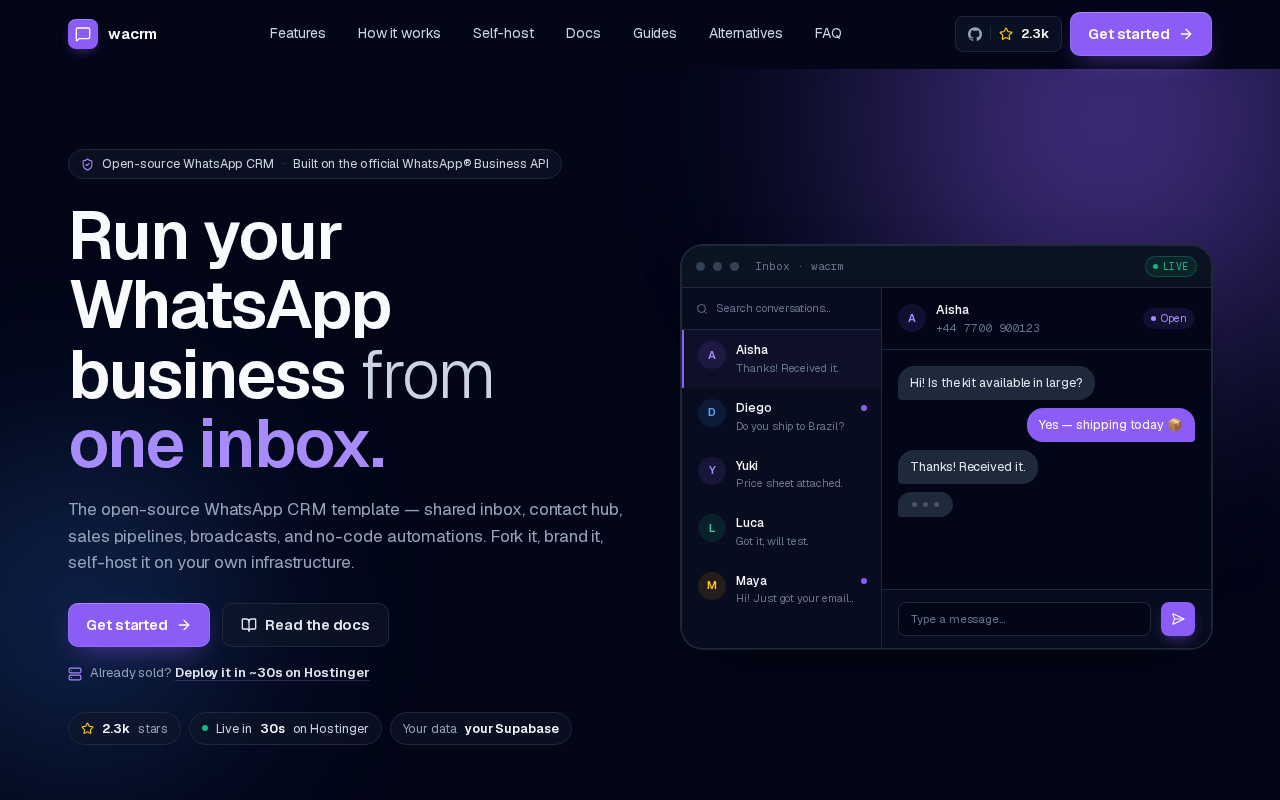
WaCRM is a self-hostable CRM template built on the official Meta WhatsApp Business Cloud API, and it is explicit about what that means: the README calls it 'a template, not a product, ' licensed MIT under the instruction 'fork it, brand it, host it.' You get the code, your own Supabase project, your own domain, and your own data. The feature set covers WhatsApp-first sales: a shared inbox with per-conversation assignment, round-robin distribution, and internal notes; a contact hub with tags, custom fields, CSV import, and deduplication; unlimited Kanban pipelines with deals linked to conversations; broadcast campaigns using Meta-approved templates with delivery, read, and reply tracking; and a no-code automation builder whose triggers include inbound messages, new contacts, tag changes, keywords, and schedules. Two additions move it past the narrower project it was a year ago. An AI reply assistant takes your own OpenAI or Anthropic key, stored encrypted, drafts one-click replies in the inbox, and can run an auto-reply bot with a per-conversation cap and human handoff, grounded in an optional knowledge base that uses Postgres full-text or pgvector semantic retrieval. A public REST API with scoped, revocable keys and an MCP server let external tools and assistants read the CRM, read-only by default with writes as an opt-in. The stack is Next.js 16, React 19, TypeScript, and Tailwind v4 on Supabase. Getting there takes real setup: fork the repo, run npm install, set Supabase credentials plus an encryption key, run migrations, then paste a Meta phone number ID and access token and expose an HTTPS webhook. Because it uses the official API, broadcasts are limited to Meta-approved templates and your number must be approved by Meta first. For a small team in a WhatsApp-heavy market that is a fair trade; for anyone needing email, a dialer, or forecasting, it is the wrong tool.
AI Capabilities
- AI reply assistant (bring your own OpenAI or Anthropic key)
- Auto-reply bot with human handoff
- Knowledge base grounding (pgvector or Postgres full-text)
- MCP server for Claude and Cursor
Key Integrations
How to install
- Fork github.com/ArnasDon/wacrm, then clone your fork and run npm install. The getting-started guide assumes Node.js 20+ and npm are already installed.
- Copy .env.local.example to .env.local. The docs state that npm run dev will not start until at least NEXT_PUBLIC_SUPABASE_URL and NEXT_PUBLIC_SUPABASE_ANON_KEY are set.
- Generate the encryption key for WhatsApp token storage with node -e "console.log(require('crypto').randomBytes(32).toString('hex'))" and paste it into ENCRYPTION_KEY. The docs warn not to change it later, because stored tokens become unreadable.
- Create a Supabase project and run the migrations per docs/supabase-setup, then connect a WhatsApp number in Settings using your Meta phone number ID and access token, with an HTTPS webhook configured (docs/whatsapp-setup).
- Run npm run dev, open http://localhost:3000, and create an account at /signup. Docker Compose is documented in docs/docker.md, and Hostinger managed Node.js hosting is the recommended one-click path, though the README notes it runs anywhere Node.js does.
Requirements
Node.js 20+, your own Supabase project, a Meta-approved WhatsApp Business number with a Cloud API access token and phone number ID, and an HTTPS webhook. You pay your own hosting and WhatsApp Business API usage.
Best for
Small teams in WhatsApp-heavy markets that want a shared inbox, pipelines, and broadcasts they can fork, brand, and host, with AI replies running on their own OpenAI or Anthropic key.
Not for
Teams that need email, a dialer, forecasting, or multi-channel outreach, and anyone who cannot get a WhatsApp Business number approved by Meta or does not want to maintain a fork.
Review notes
WaCRM is a fork-and-own template rather than a product you install, and the README is blunt about the consequences: 'your code, your Supabase project, your domain, your data.' The contributing policy follows the same logic, saying feature PRs often belong in your fork rather than upstream, so plan to carry your customizations yourself. Assessed from the repository and the docs site; we have not run an instance.
The channel decision defines the tool. It talks to the official Meta Cloud API, which brings template approvals, delivery and read tracking, and an HTTPS webhook requirement, and rules out the casual WhatsApp Web wrapper experience. The docs' own framing is honest about the gate: most teams are live in under 30 minutes once their WhatsApp Business number has been approved by Meta. Approval is the long pole, not the deploy.
Setup is documented to a level most template projects never reach. The getting-started guide states the minimum environment, gives a one-line command to generate the 64-character encryption key used for token storage, and warns that rotating it makes stored WhatsApp tokens unreadable. Docker and Hostinger deployment paths both exist.
Security posture is specified rather than hand-waved: WhatsApp access tokens encrypted at rest, row-level security throughout, HMAC-verified webhooks, CSP, and rate limiting. For a tool that holds WhatsApp credentials for a whole sales team, that list is the part worth reading before you fork.
Verdict
A legitimate starting point for WhatsApp-first sales teams that can run Node and Supabase; the official API brings template approvals and Meta vetting along with the delivery tracking.
Pros and cons
| Pros | Cons |
|---|---|
| ✓ MIT licence with free self-hosting | ✗ No hands-on test - this assessment is based on vendor documentation and the public repository |
| ✓ AI capabilities: AI reply assistant (bring your own OpenAI or Anthropic key) | |
| ✓ Established community (2,285 GitHub stars) | |
| ✓ Native integrations include Meta WhatsApp Cloud API, Supabase, OpenAI (8 listed) |
Building your martech shortlist?
The weekly newsletter: one tool teardown, one workflow, no fluff. Free.
Frequently asked questions
What is WaCRM?
Self-hostable CRM for WhatsApp with shared inbox, sales pipelines, broadcasts, and automations. It ships with AI reply assistant (bring your own OpenAI or Anthropic key), 2,285 GitHub stars. MartechSignal's review covers features, pricing, and how it compares to alternatives.
How much does WaCRM cost?
WaCRM is open source - MIT licensed and free to self-host; the public repository carries 2,285 stars; native integrations cover Meta WhatsApp Cloud API, Supabase, OpenAI. You pay in server time and maintenance, not licences.
Is WaCRM a good CRM tool in 2026?
A legitimate starting point for WhatsApp-first sales teams that can run Node and Supabase; the official API brings template approvals and Meta vetting along with the delivery tracking.
Is WaCRM free?
The code is MIT-licensed and free to fork, modify, and ship, with no user or record limits. The costs around it are yours: a Supabase project, hosting, and WhatsApp Business API usage billed by Meta. The docs recommend Hostinger's managed Node.js hosting, where plans start at a few dollars a month, though the README notes it runs anywhere Node.js does, including Vercel, Railway, or your own VPS. The AI reply assistant has no per-seat fee because you bring your own OpenAI or Anthropic key.
Does WaCRM use the official WhatsApp API or WhatsApp Web?
The official one. Both the README and the docs site state that WaCRM talks to the Meta WhatsApp Business Cloud API using a phone number ID and access token you supply, and that any Meta-approved BSP exposing the same endpoints works. The practical consequences are delivery and read tracking on broadcasts, plus template management inside the app with live Meta approval status, balanced by a requirement that your number be approved by Meta and that broadcasts use Meta-approved templates.
Does WaCRM have AI features?
Yes. The AI reply assistant uses your own OpenAI or Anthropic key, stored encrypted, to draft one-click replies in the inbox or run an auto-reply bot with a per-conversation cap and human handoff, optionally grounded in a knowledge base retrieved with Postgres full-text search or pgvector when an embeddings key is set. There is also an MCP server so Claude, Cursor, and similar assistants can read the CRM, read-only by default with writes as an opt-in.
Can WaCRM run multiple WhatsApp numbers?
One phone number per user account: the schema enforces a unique phone_number_id and the API returns a 409 if you try to attach a number that is already claimed. Shared inbox access is handled by adding multiple humans to one account with owner, admin, agent, or viewer roles rather than by attaching several numbers to a team. If you need several numbers, run several instances, which the Docker setup supports but does not orchestrate for you.
What breaks if I skip the cron setup in WaCRM?
Automations and flows never run. The container schedules nothing internally, so the docs have you point an external cron at /api/automations/cron and /api/flows/cron with an x-cron-secret header; without it those endpoints return 503 and your auto replies and flows silently do not fire. From the inbox it looks like a broken WhatsApp connection, so check the cron before you debug the Cloud API.